
igloohome
IgloohomeHouse & Home
4.267.00 Reviews
- Version
- 3.4.0
- Installs
- 100.00K
- Age Rating
- Everyone
Screenshots
Our Review of igloohome
 Analysis by Appyee
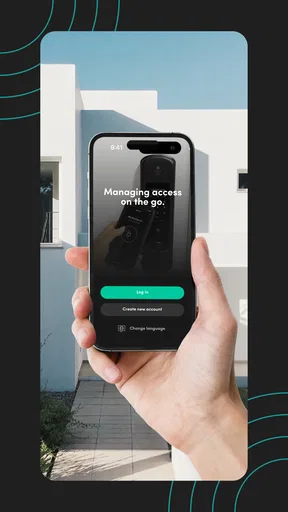
I like smart-home apps most when they solve a small, repeated problem without making everyday life feel more complicated. igloohome is built around that idea: it gives owners of compatible smart locks a place to manage smart access from a phone. I found it more useful as a practical access-control tool than as a general home-automation dashboard, and that distinction matters before you install it.
The app is free, carries an Everyone age rating, and comes from Igloohome, the developer behind the lock ecosystem. It belongs in the House & Home category, but its real audience is narrower than that label suggests: people who already use, or are considering, an igloohome smart lock. If you only want a digital checklist for keys or a broad collection of connected-home controls, this is not the right starting point.
On Android, the current release is version 3.4.0 and it supports devices running Android 7.0 or later. The app has passed the early-adopter stage, with over 100,000 installs, an average rating of 4.2 from around 670 ratings, and roughly 67 written reviews. Those figures suggest a reasonably established companion app, although they do not replace checking whether your particular lock model is supported before depending on it.
How the app fits into real home access
The simplest way to understand igloohome is to think of it as the control panel for a compatible lock. Instead of keeping every access decision tied to a physical key, I can use the app to organize smart entry and manage who should be able to use it. That is especially useful for homes, rooms, short-term rentals, offices, and other places where access changes more often than the hardware does.
That does not mean the app turns any ordinary door into a smart door. The lock itself remains the important purchase and the physical foundation of the system. The free app is valuable because it helps operate that hardware, not because it replaces it. This is the first cost distinction I would make to a friend: downloading the application costs nothing, while the overall smart-lock setup depends on owning compatible equipment.
In daily use, the benefit is less about opening a lock a few seconds faster and more about reducing coordination. A family member can be given access without handing over a spare key. A cleaner can be allowed in during an agreed window instead of receiving a permanent copy. A property manager can handle several access arrangements without carrying a ring of keys. The app earns its place when those situations happen repeatedly.
Where the free app delivers value
The strongest value comes from turning access into something manageable rather than purely physical. A traditional key is simple, but it is difficult to control once it leaves your hand. Changing the arrangement usually means collecting it, copying another one, or replacing the lock. A smart-lock app offers a more flexible way to think about entry, provided the owner is comfortable managing access digitally.
I would also separate convenience from security claims. The app can make access administration easier, but convenience is not automatically the same as perfect security. Your phone, account, lock, and the people receiving access all become part of the system. That is not a reason to avoid it; it is a reason to treat setup and access decisions with the same care you would give physical keys.
A useful workflow is to create access for a specific purpose rather than giving everyone the broadest permission available. For example, when a relative is checking on an empty home, I would prepare access for that visit and then review or remove it afterward. That habit keeps the access list understandable and prevents old arrangements from quietly becoming permanent.
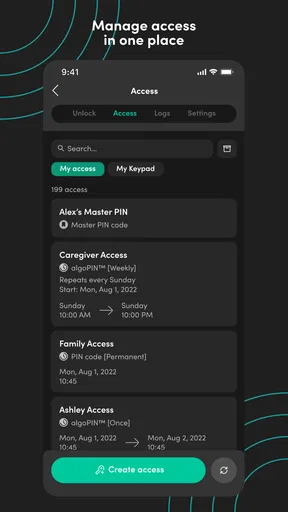
Another practical advantage is visibility. A physical key does not tell me who still has one, while a managed access system gives me a clearer place to review the people and arrangements connected with the lock. I would not treat that as a substitute for checking the door itself, but it makes household administration less dependent on memory.
A realistic everyday scenario
Imagine leaving town for a few days while a friend looks after a pet. With a conventional lock, I might hide a key, leave one with a neighbor, or arrange a handoff. Each option creates a small problem: the key can be misplaced, the timing may change, and I may forget to retrieve it. With a compatible igloohome setup, I can use the app to organize access for the person who needs it, then clean up that arrangement after the visit.
The important detail is the follow-through. I would not simply grant access and forget about it. Before the friend arrives, I would confirm the correct lock and recipient, make sure the person understands how entry works, and check the arrangement again when the visit ends. That small routine is one of the app’s less obvious lessons: digital access is easier to change than a key, but it still needs active ownership.
The same pattern works for a contractor who needs one visit, a tenant turnover, or a shared storage area. The app is most convincing when access has a beginning and an end. If everyone needs unrestricted, permanent entry, a conventional key may be simpler and cheaper to administer.
What I would check before relying on it
My first check would be compatibility. Because igloohome is a companion for smart locks rather than a universal lock-management tool, the app only makes sense alongside supported hardware. I would identify the exact lock model, confirm that it works with the app, and verify that the phone’s operating system meets the Android 7.0 minimum before planning a move or rental workflow around it.
I would also test the complete process before giving access to someone else. That means installing the app, signing in, locating the lock, creating the intended arrangement, and practicing the recipient’s side of the experience. A system that seems obvious to the owner may still be confusing to a guest who has never used a smart lock. A short test is far better than discovering that confusion at the front door.
Phone dependence is another trade-off to consider. A digital access system can be convenient, but it introduces more moving parts than a metal key. The owner needs to keep the account usable, and visitors need clear instructions. I would keep a sensible backup plan for important doors, especially when access is needed during travel, a move, or an urgent repair.
There is also a human-management issue. If a household has several people changing access frequently, the app can make those changes easier, but it can also create clutter if nobody reviews old entries. I recommend treating the access list like a shared calendar: use clear names, avoid vague labels, and remove arrangements that no longer have a purpose.
How it compares with ordinary alternatives
Compared with a standard key, igloohome offers better flexibility for changing access and less dependence on physical handoffs. The key still wins for simplicity: it has no app learning curve and is familiar to almost everyone. For a single-family home where the same people enter every day, the smart approach may feel like extra administration rather than a meaningful improvement.
Compared with a keypad-only lock, the app gives the owner a more convenient place to manage the access side of the system. A keypad can be excellent when every visitor can use a code and the owner rarely needs a detailed overview. The app becomes more attractive when access must be prepared, adjusted, or reviewed from a phone.
Compared with a broad smart-home platform, igloohome is more focused. I see that as both a strength and a limitation. The narrower purpose can make sense if smart entry is the only home feature I need, but it will not be my first choice if I want one application to coordinate lights, cameras, thermostats, alarms, and locks together. In that situation, I would compare ecosystem compatibility before choosing the lock.
The cost comparison also needs honesty. The application itself is free, so there is no app purchase to justify or recover. The meaningful expense is the compatible lock and the surrounding setup, and that is where a buyer should compare alternatives. I would not call the complete solution inexpensive merely because the download has no charge.
Small habits that make the system work better
One useful habit is to prepare access before the person is standing outside. I would create and test the arrangement early, then send simple instructions that explain which door to use and what to do if the expected method does not work. This reduces pressure and exposes mistakes while there is still time to correct them.
A second habit is to separate recurring access from one-off access. A dog walker who visits every week may need a different arrangement from a plumber who comes once. Keeping those purposes distinct makes later cleanup easier and helps me notice when an old permission no longer belongs there.
A third is to review access after life changes. When a tenant leaves, a cleaner stops working, a roommate moves out, or a family arrangement changes, I would immediately revisit the app rather than trusting that everyone will remember the old plan. This is where a smart-lock system can be safer in practice than a pile of copied keys, but only if the owner actually maintains it.
I would also avoid treating the phone as the only source of confidence. Before a high-stakes trip, I would check the lock physically, confirm that the intended person can enter, and make sure everyone knows the backup plan. The app can organize access, but it cannot remove the need for basic preparation.
Who will get the most from it?
igloohome makes the most sense for people who already own compatible hardware and regularly share access. Hosts, landlords, property managers, families with caregivers, and owners of a second home are natural candidates because their access needs change over time. For them, the free companion app can turn repeated key handoffs into a more organized routine.
It is also a good fit for someone who values central control over several access arrangements and is willing to spend a few minutes learning the workflow. The benefit grows when the lock serves more than one person or when visits happen at inconvenient times. In those cases, the app’s value is operational rather than decorative.
I would be more cautious for a person who dislikes account-based services, rarely shares a door, or wants the absolute simplest possible entry method. If the household has one key per resident and no visitor problem, a conventional lock may deliver the better experience. The same is true for someone choosing a lock before checking ecosystem compatibility; the app should not be the reason to buy hardware blindly.
People who expect a complete smart-home command center should also look elsewhere or compare integrations carefully. This app’s identity is tied to smart lock and smart access management. That focus is useful, but it should not be mistaken for a promise that every connected-home device will live inside the same experience.
My verdict on downloading and using it
I would recommend downloading igloohome when I had a compatible Igloohome lock and a real need to manage changing access. The free app provides a sensible reason to use smart-lock hardware: it helps turn entry from a fixed key problem into an arrangement I can review and adjust. Its value is clearest in homes and properties where visitors, tenants, workers, or relatives need different kinds of access.
I would not recommend installing it first and hoping the app alone will solve a door-security problem. Start with the lock model, the people who need entry, and the backup plan. Then use the app deliberately, test the workflow, and keep the access list tidy. That approach avoids the common mistake of confusing a convenient interface with a fully automatic security system.
With its free access, Everyone rating, established presence, and current Android support down to version 7.0, it is easy to try when the hardware is already part of your home. The real decision is not whether the download is worth paying for; it is whether flexible digital access is worth building into your routine.
My final view is positive but specific: igloohome is a useful companion for people who need to share and manage smart-lock access, not a must-have home app for everyone. If your everyday problem is lost keys, awkward handoffs, or temporary entry, it can be a practical upgrade. If your door is shared by the same small group and simplicity matters more than remote administration, the ordinary alternative may still be the better choice.
Verdict
Strengths of igloohome
- Works with selected smart locks and keyboxes without Wi‑Fi at the lock.
- Temporary PINs make sharing access with guests or service providers convenient.
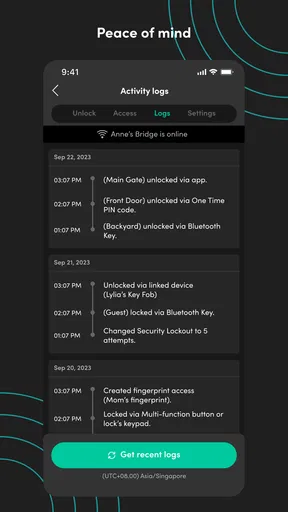
- Activity logs help owners monitor when access codes were used.
- Clean interface makes managing multiple properties relatively straightforward.
- Useful for rentals, Airbnb hosts, offices, and short-term access management.
Limitations of igloohome
- Requires compatible igloohome hardware, limiting usefulness without its devices.
- Some advanced features may require a paid subscription or extra hardware.
- Bluetooth setup can be unreliable when the phone is too far from the lock.
- Lost phone access can complicate management until account recovery is completed.
- Battery replacement and lock maintenance remain the owner's responsibility.
Similar Picks in This Category
View All
Universal TV Remote Control
CodeMatics Media Solutions3.9

AlfredCamera Home Security app
Alfred Systems Inc.4.7

Planner 5D: AI Home Design
Planner 5D4.5

Universal Tv Remote-Cast to TV
One Music Player4.1

Zillow: Homes for Sale & Rent
Zillow Group4.8

99acres Buy/Rent/Sell Property
infoedge.com4.3
Frequently Asked Questions
What is igloohome, and how does it work?
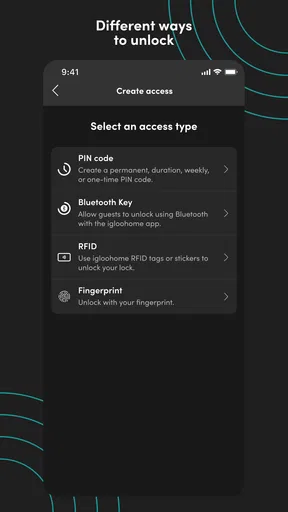
igloohome is a smart access app that works with compatible igloohome locks, keyboxes, and other entry devices. After pairing a device, you can manage access, create PIN codes or Bluetooth keys, check activity logs, and adjust selected settings from your phone. The exact features depend on the lock model and whether you are connected locally or using supported online functions.
Do I need an internet connection to use igloohome?
An internet connection is generally needed for account setup, device pairing, software updates, cloud synchronization, and managing certain features remotely. However, many igloohome devices use Bluetooth, so you may still be able to unlock or configure a compatible lock when you are nearby without mobile data or Wi-Fi. Availability can vary by product, so checking the specific model is recommended.
Can I share access with family members, guests, or tenants?
Yes. igloohome is designed to let owners share access without handing over a physical key. Depending on the device, you can issue permanent, recurring, or time-limited PIN codes and Bluetooth keys. This is useful for homes, rentals, offices, and vacation properties. Before sharing, verify the recipient’s phone compatibility and make sure the access dates and permissions are correct.
Is igloohome secure enough for everyday use?
igloohome devices are built around electronic access controls, encrypted communication, PIN-based entry, and activity monitoring, but security also depends on how the account and device are managed. Use a strong account password, keep the app updated, protect your phone, and avoid sharing access details publicly. Users should also keep a backup entry plan in case of a dead battery or technical issue.
What happens if my phone, battery, or lock stops working?
If your phone is lost, access can usually be managed from another compatible device after signing in, although some actions may require Bluetooth proximity or an internet connection. Smart locks typically provide low-battery warnings and may include emergency power options, depending on the model. It is important to review the manual, carry a backup method when possible, and avoid waiting until the battery is completely depleted.
